


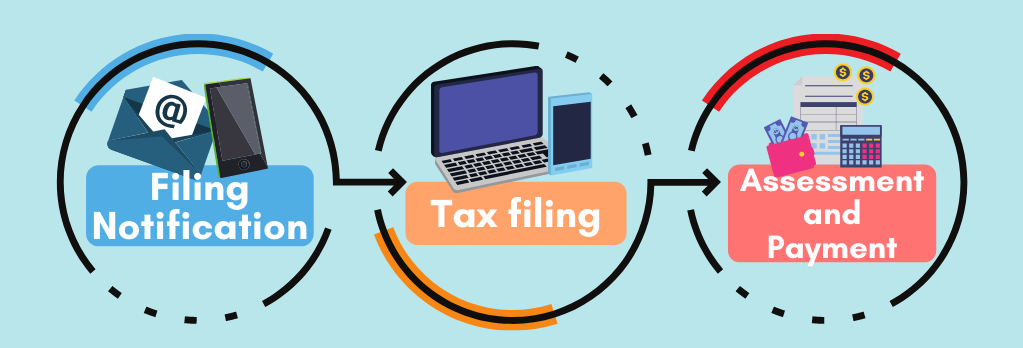
Update particulars
You may start filing your Income Tax between 1 Mar and 18 Apr 2026. This page outlines the steps and information required when filing.
Need help with e-filing? Visit go.gov.sg/efilingguide to view our step-by-step e-Filing guides.
On this page:
Understanding what happens during tax season
If you have updated your notification preferences to receive digital notices, you will be notified via SMS and/or email when your Notice of Assessment is ready for viewing at myTax Portal.
To update your notice preferences, you may use the 'Update Contact & Notice Preferences' digital service at myTax Portal.
Find out your tax filing obligation from 1 Mar
To find out if you are required to file an Income Tax Return, log into myTax Portal:
If your myTax Portal displays:
- You are under Direct Notice of Assessment (D-NOA).
- No action is required from you at the moment.
- IRAS will inform you if any action is required.
- Otherwise, your Notice of Assessment (NOA) (i.e. tax bill) will be finalised based on your income information submitted by your employer, eligible tax reliefs based on your previous assessment year's approved claims, and other relevant information available in our records.
- You will receive your NOA from mid Mar.
- If there is any inaccurate information (i.e. income and/or relief claims) in your NOA, please use the 'Amend Tax Bill' digital service to make the necessary adjustments within 30 days from the date of your tax bill.
- You do not need to file an Income Tax Return. You may verify your pre-filled information by clicking the "Verify" button displayed in myTax Portal.
- If you wish to make any adjustments, you may file your Income Tax Return (click on “Individuals” > “File Income Tax Return”) by 18 Apr 2026 to update your income and relief details, such as:
- Additional or non-pre-filled sources of income to report (e.g. rental income); or
- Changes to your personal relief claims (e.g. you no longer meet the qualifying conditions).
- File your Income Tax Return by clicking the "File" button displayed in myTax Portal by 18 Apr 2026.
- If your employer is in the Auto-Inclusion Scheme (AIS) for employment income:
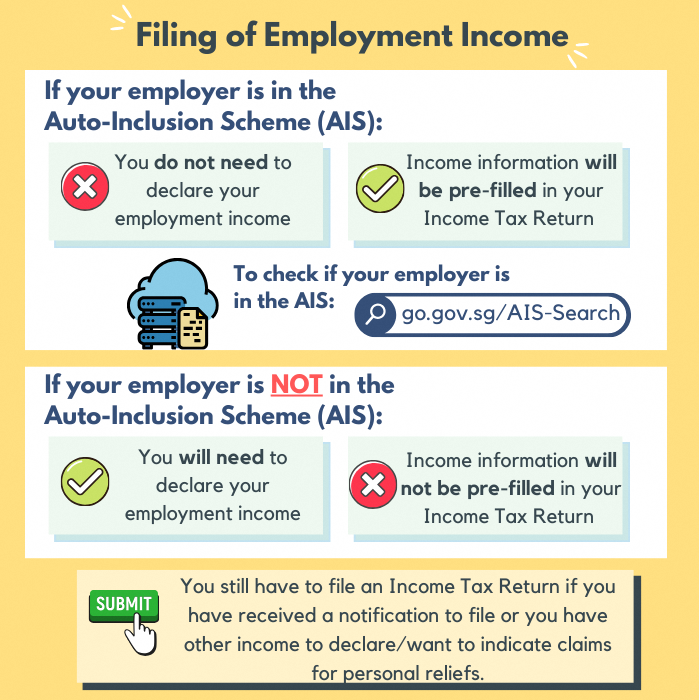
- They will submit your income information to IRAS by 1 Mar each year.
- You do not need to declare your employment income information as this will be pre-filled in your Income Tax Return.
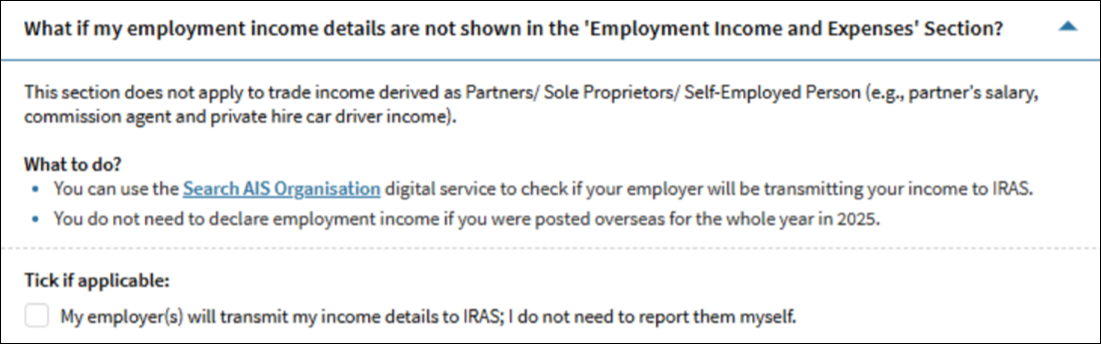
- If the details are not shown under the “Employment Income and Expenses” section in the Income Tax Return, tick the “My employer(s) will transmit my income details to IRAS; I do not need to report them myself.” option:
- Generally, you will be required to submit your Income Tax Return if in the preceding calendar year (i.e. from 1 Jan to 31 Dec 2025):
- Your total income is more than $22,000; or
- You have self-employment income with a net profit more than $6,000; or
- You are a non-resident who derived income from Singapore
- If you meet any of the requirements above, please proceed to file your Income Tax Return (click on “Individuals” > “File Income Tax Return”). Otherwise, you do not need to file an Income Tax Return.
What happens after you file
You will see an acknowledgment page on the screen after you click “Submit” if you have successfully filed.
If there are any changes, you may re-file your Income Tax Return once by 18 Apr.
You will generally receive your Notice of Assessment (i.e. tax bill) from end Apr to end Sep 2026*.
Check your tax bill to ensure that it is accurate. You have a legal duty to inform IRAS of any inaccurate information on your income and/or relief claims in your tax bill. There are penalties for failing to do so.
Refer to Tax Season 2026 - About your tax bill for more information.
*If you are under the Direct Notice of Assessment (D-NOA) scheme, you would have received your tax bill in Mar 2026.
FAQs
Your employer has submitted your income information for the year 2025 (Year of Assessment 2026) to us directly. For any discrepancy, please check with your employer directly. They will resubmit the information to us if there are errors in the original submission, and this will be included in your tax bill.
If your employer is not participating under AIS, your employer should have provided you with the Form IR8A by 1 Mar. You should enter the details during your tax filing as per the information in your Form IR8A. If you do not have the Form IR8A, please request it from your employer.
You are not required to submit your Form IR8A or other supporting documents unless specifically stated at the acknowledgement page after you have filed.
You may claim personal reliefs and rebates if you are Singapore tax resident and have met the qualifying conditions for the respective reliefs/rebates in the preceding year (i.e. 1 Jan to 31 Dec 2025).
Find out which reliefs you may be eligible for:
To check your eligibility for Parenthood Tax Rebate, use the Parenthood Tax Rebate Eligibility Tool (XLSM, 67KB).
Generally, you may claim tax deductions on expenses "wholly and exclusively" incurred in earning your income. Find out more about deductions for the different types of expenses (e.g. employment expenses, business expenses).
To simplify the tax filing for rental expenses, you may opt to claim the rental expenses based on 15% of the gross rental income derived from the tenanted residential property, instead of the actual amount of deductible expenses incurred. In addition to the 15%, you may claim a deduction on interest paid on the loan taken to purchase the property. You may use the Rental Calculator (XSLM, 146KB) to decide if it is beneficial to claim 15% deemed rental expenses or to claim based on actual rental expenses incurred. Find out more about the Simplification of Claim of Rental Expenses for Individuals.
If you need additional time to file your Income Tax Return, an extension of up to 14 days may be granted. You may use 'Apply for Extension of Time to File' digital service at myTax Portal.